Description
In this article, I am going to write vbscript code to find and get list of group members in Active Directory domain. it contains vbscript samples to get list of Active Directory Group member names in command line output and vbscript to export AD Group members into CSV file.
Note: You should run this VBScript code on a machine with windows Active Directory domain.
Summary
Get list of AD Group Members in command line output using VBScript
1. Copy the below example vbscript code and paste it in notepad or a VBScript editor.
2. Save the file with a .vbs extension, for example: GetADGroupMembers.vbs
3. Run usage in CMD:
C:> CScript <vbscript file path> <groupName>
Example: CScript C:ScriptsGetADGroupMembers.vbs “Domain Admins”
4. Run the above command to get Active Directory members list
Click to get vbscript code as file Download GetADGroupMembers.vbs
' GetADGroupMembers.vbs
' Sample VBScript to Get List of AD Group Members.
' CMD Usage:
'     CScript <vbscript file path> <groupName>
' Ex: CScript C:ScriptsGetADGroupMembers.vbs "Domain Admins"
' Author: https://www.morgantechspace.com/
' ------------------------------------------------------'

Dim groupName,strMember
Dim objGroup,objMember

if Wscript.arguments.count = 0 then
    Wscript.echo "Invalid input parameters"
    Wscript.echo "   "
    Wscript.echo "Script Usage:"
    Wscript.echo "----------------------------------------"
    Wscript.echo "CScript <vbscript file path> <groupName>"
    Wscript.echo "---------------------------------------"
    Wscript.echo "Ex: CScript C:ScriptsGetADGroupMembers.vbs ""Domain Admins"" "
    Wscript.echo "---------------------------------------"
    WScript.quit
else

  ' Get the group name from command line parameter
    groupName = WScript.Arguments(0)

end if

' Get the distinguished name of the group
Set objGroup = GetObject("LDAP://" & GetDN(groupName))

' List the member’s full name in the group
For Each strMember in objGroup.Member
    Set objMember =  GetObject("LDAP://" & strMember)
    Wscript.Echo objMember.CN
Next

WScript.quit
' Active Directory Group Members listed successfully using VBScript

'****************Function to Get DN of group****************
'
Function GetDN(groupName)

Dim objRootDSE, adoCommand, adoConnection
Dim varBaseDN, varFilter, varAttributes
Dim adoRecordset

Set adoCommand = CreateObject("ADODB.Command")
Set adoConnection = CreateObject("ADODB.Connection")
adoConnection.Provider = "ADsDSOObject"
adoConnection.Open "Active Directory Provider"
Set adoCommand.ActiveConnection = adoConnection

' Search entire Active Directory domain.
Set objRootDSE = GetObject("LDAP://RootDSE")

varDNSDomain = objRootDSE.Get("defaultNamingContext")
varBaseDN = "<LDAP://" & varDNSDomain & ">"

' Filter on group objects.
varFilter = "(&(objectClass=group)(|(cn="& groupName &")(name="& groupName &")))"

' Comma delimited list of attribute values to retrieve.
varAttributes = "distinguishedname"

' Construct the LDAP syntax query.
strQuery = varBaseDN & ";" & varFilter & ";" & varAttributes & ";subtree"
adoCommand.CommandText = strQuery
adoCommand.Properties("Page Size") = 1000
adoCommand.Properties("Timeout") = 20
adoCommand.Properties("Cache Results") = False

' Run the query.
Set adoRecordset = adoCommand.Execute

IF(adoRecordset.EOF<>True) Then
   GetDN=adoRecordset.Fields("distinguishedname").value
Else
   'No group found
End if

' close ado connections.
adoRecordset.Close
adoConnection.Close

End Function

'****************End of Function to Get DN of group****************
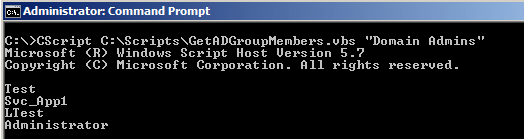
AD Group members command line output:
VBScript to Export AD Group Members into CSV file
1. Copy the below example vbscript code and paste it in notepad or a VBScript editor.
2. Save the file with a .vbs extension, for example: ExportADGroupMembers.vbs
3. Run usage in CMD:
C:> CScript <vbscript filepath> <groupName> <csvFilePath>
Example: CScript ExportADGroupMembers.vbs “Domain Admins” “C:\ADGroupMembers.csv”
4. Run the above command to Export Active Directory members into CSV file
Click to get vbscript code as a file Download ExportADGroupMembers.vbs
' ExportADGroupMembers.vbs
' Sample VBScript to Export AD Group Members into CSV file.
' CMD Usage: CScript <vbscript filepath> <groupName> <csvFilePath>
' Ex: CScript ExportADGroupMembers.vbs "Domain Admins" "C:\ADGroupMembers.csv"
' Author: https://www.morgantechspace.com/
' ------------------------------------------------------'

Dim groupName,strMember,csvFilePath
Dim objGroup,objMember
Dim objFSO, objCSVFile

if Wscript.arguments.count < 2 then
    Wscript.echo "Invalid input parameters"
    Wscript.echo "   "
    Wscript.echo "Script Usage:"
    Wscript.echo "-----------------------------"
    Wscript.echo "CScript <vbscript file path> <groupName> <csvFilePath>"
    Wscript.echo "   "
    Wscript.echo "Ex: CScript C:ScriptsExportADGroupMembers.vbs ""Domain Admins"" "&_
                      " ""C:\ADGroupMembers.csv"" "
    WScript.quit
else

  ' Get the group name and csv file path from command line parameters
    groupName = WScript.Arguments(0)
    csvFilePath = WScript.Arguments(1)

end if

' Get the distinguished name of the group
Set objGroup = GetObject("LDAP://" & GetDN(groupName))

' Create CSV file
Const ForWriting = 2

Set objFSO = CreateObject("Scripting.FileSystemObject")

Set objCSVFile = objFSO.CreateTextFile(csvFilePath, _
    ForWriting, True)

' Write AD Attributes CN and distinguishedname
' as CSV columns(first line)

 objCSVFile.Write "CN,distinguishedname"

 objCSVFile.Writeline ' New Line


' List the member’s full name in the group
For Each strMember in objGroup.Member
    Set objMember =  GetObject("LDAP://" & strMember)
   ' Retrieve values and write into CSV file.

     objCSVFile.Write objMember.CN & ","
     objCSVFile.Write """" &strMember & """"
     objCSVFile.Writeline  ' New Line
Next

Wscript.echo "AD Group '"&groupName&"' members are Exported into CSV file '"&_
             csvFilePath&"'"

WScript.quit
' Active Directory Group Members listed successfully using VBScript

'****************Function to Get DN of group****************
'
Function GetDN(groupName)

Dim objRootDSE, adoCommand, adoConnection
Dim varBaseDN, varFilter, varAttributes
Dim adoRecordset

Set adoCommand = CreateObject("ADODB.Command")
Set adoConnection = CreateObject("ADODB.Connection")
adoConnection.Provider = "ADsDSOObject"
adoConnection.Open "Active Directory Provider"
Set adoCommand.ActiveConnection = adoConnection

' Search entire Active Directory domain.
Set objRootDSE = GetObject("LDAP://RootDSE")

varDNSDomain = objRootDSE.Get("defaultNamingContext")
varBaseDN = "<LDAP://" & varDNSDomain & ">"

' Filter on group objects.
varFilter = "(&(objectClass=group)(|(cn="& groupName &")(name="& groupName &")))"

' Comma delimited list of attribute values to retrieve.
varAttributes = "distinguishedname"

' Construct the LDAP syntax query.
strQuery = varBaseDN & ";" & varFilter & ";" & varAttributes & ";subtree"
adoCommand.CommandText = strQuery
adoCommand.Properties("Page Size") = 1000
adoCommand.Properties("Timeout") = 20
adoCommand.Properties("Cache Results") = False

' Run the query.
Set adoRecordset = adoCommand.Execute

IF(adoRecordset.EOF<>True) Then
   GetDN=adoRecordset.Fields("distinguishedname").value
Else
   'No group found
End if

' close ado connections.
adoRecordset.Close
adoConnection.Close

End Function

'****************End of Function to Get DN of group****************
Export Active Directory Group members CMD usage:

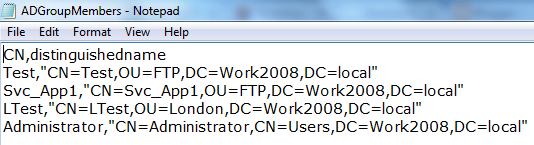
AD Group members CSV file output: