
Note: You should run this VBScript code on a machine with windows Active Directory domain.
Summary
- VBScript to Disable AD User Account by UserName
- VBScript to Disable AD User by UserName as Dynamic input
VBScript to Disable Active Directory User by UserName
1. Copy the below example vbscript code and paste it in notepad or a VBScript editor.
2. Change the value for strUserName with your own user’s name or samAccountName to disable.
3. Save the file with a .vbs extension, for example: DisableADUserByUserName.vbs
4. Double-click the vbscript file (or Run this file from command window) to disable AD user.
Click to get vbscript code as a file Download DisableADUserByUserName.vbs
' DisableADUserByUserName.vbs
' Sample VBScript to disable AD user .
' Author: https://www.morgantechspace.com/
' ------------------------------------------------------'

Option Explicit
Dim adoCommand, adoConnection
Dim varBaseDN, varFilter, varAttributes
Dim objRootDSE, varDNSDomain, strQuery, adoRecordset,strUserDN
Dim strUserName,objUser

' Setup ADO objects.
Set adoCommand = CreateObject("ADODB.Command")
Set adoConnection = CreateObject("ADODB.Connection")
adoConnection.Provider = "ADsDSOObject"
adoConnection.Open "Active Directory Provider"
Set adoCommand.ActiveConnection = adoConnection

' Search entire Active Directory domain.
Set objRootDSE = GetObject("LDAP://RootDSE")

varDNSDomain = objRootDSE.Get("defaultNamingContext")
varBaseDN = "<LDAP://" & varDNSDomain & ">"

strUserName="LTest"

' Filter on user objects.
varFilter = "(&(objectCategory=person)(objectClass=user)(|(name="& strUserName &")(samaccountname="& strUserName &")))"

' Comma delimited list of attribute values to retrieve.
varAttributes = "samaccountname,distinguishedname"

' Construct the LDAP syntax query.
strQuery = varBaseDN & ";" & varFilter & ";" & varAttributes & ";subtree"
adoCommand.CommandText = strQuery
adoCommand.Properties("Page Size") = 1000
adoCommand.Properties("Timeout") = 20
adoCommand.Properties("Cache Results") = False

' Run the query.
Set adoRecordset = adoCommand.Execute

' Enumerate the resulting recordset.
IF(adoRecordset.EOF<>True) Then
    ' Retrieve values and display.
    strUserDN = adoRecordset.Fields("distinguishedname").value
    Set objUser = GetObject("LDAP://"& strUserDN)
        objUser.AccountDisabled = True
        objUser.SetInfo

       WScript.Echo "The user '"& strUserName &"' disabled successfully..."

Else
      WScript.Echo "No user found with the name '"& strUserName &"'"
 End if

' close ado connections.
adoRecordset.Close
adoConnection.Close
VBScript to Disable Active Directory User by UserName as Dynamic input
1. Copy the below example VBScript code and paste it in notepad or a VBScript editor.
2. Save the file with a .vbs extension, for example: DisableADUserByDynamicUserName.vbs
3. Double-click the vb script file (or Run this file from command window) to disable AD user.
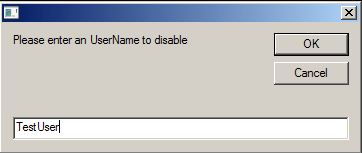
4. Enter the name or samAccountName of the user in the input text box and click OK to proceed.
Click to get vbscript code as a file Download DisableADUserByDynamicUserName.vbs
' DisableADUserByDynamicUserName.vbs
' Sample VBScript to disable AD user by Dynamic UserName .
' Author: https://www.morgantechspace.com/
' ------------------------------------------------------'

Option Explicit
Dim adoCommand, adoConnection
Dim varBaseDN, varFilter, varAttributes
Dim objRootDSE, varDNSDomain, strQuery, adoRecordset,strUserDN
Dim strUserName,objUser

' Asks user name from user.
Do
   strUserName = InputBox ("Please enter an UserName to disable")
   If strUserName = "" then
      Msgbox "No user name entered"
   end if
Loop Until strUserName <> ""

' Setup ADO objects.
Set adoCommand = CreateObject("ADODB.Command")
Set adoConnection = CreateObject("ADODB.Connection")
adoConnection.Provider = "ADsDSOObject"
adoConnection.Open "Active Directory Provider"
Set adoCommand.ActiveConnection = adoConnection

' Search entire Active Directory domain.
Set objRootDSE = GetObject("LDAP://RootDSE")

varDNSDomain = objRootDSE.Get("defaultNamingContext")
varBaseDN = "<LDAP://" & varDNSDomain & ">"

' Filter on user objects.
varFilter = "(&(objectCategory=person)(objectClass=user)(|(name="& strUserName &")(samaccountname="& strUserName &")))"

' Comma delimited list of attribute values to retrieve.
varAttributes = "samaccountname,distinguishedname"

' Construct the LDAP syntax query.
strQuery = varBaseDN & ";" & varFilter & ";" & varAttributes & ";subtree"
adoCommand.CommandText = strQuery
adoCommand.Properties("Page Size") = 1000
adoCommand.Properties("Timeout") = 20
adoCommand.Properties("Cache Results") = False

' Run the query.
Set adoRecordset = adoCommand.Execute

' Enumerate the resulting recordset.
IF(adoRecordset.EOF<>True) Then
    ' Retrieve values and display.
    strUserDN = adoRecordset.Fields("distinguishedname").value
    Set objUser = GetObject("LDAP://"& strUserDN)
        objUser.AccountDisabled = True
        objUser.SetInfo

       WScript.Echo "The user '"& strUserName &"' disabled successfully..."

Else
      WScript.Echo "No user found with the name '"& strUserName &"'"
 End if

' close ado connections.
adoRecordset.Close
adoConnection.Close